Celebrating Independence Day Through Innovation and Digital Transformation
Introduction India’s Independence Day is a celebration of freedom, progress, resilience, and the vision of building a stronger nation. As India continues to evolve into a global technology and innovation hub, digital transformation has become an important part of this journey. From startups and enterprises to government services and everyday consumers, technology is changing how people work, communicate, access services, and create opportunities. Digital transformation in India is enabling organizations to improve efficiency, develop innovative products, expand their reach, and compete in an increasingly connected global economy. At MyFluiditi, we believe that innovation and technology can contribute to this progress by helping businesses adopt modern digital solutions that create meaningful and sustainable value. The Connection Between Independence and Innovation Independence represents the ability to create opportunities, make progress, and shape the future with confidence. In today’s digital economy, technological innovation plays a similar role for businesses by reducing limitations and creating new possibilities. Organizations can use cloud computing, Artificial Intelligence, automation, data analytics, and modern software platforms to improve operations and develop new business models. Technology innovation gives businesses the ability to adapt to changing markets while creating solutions that meet evolving customer expectations. MyFluiditi helps organizations transform ideas into practical digital solutions that support innovation and long-term business growth. India’s Growing Digital Transformation Journey India has experienced significant growth in digital adoption across industries. Businesses are increasingly using digital platforms, cloud applications, mobile technologies, analytics, automation, and AI-powered solutions to modernize their operations. This transformation is creating new opportunities for businesses of different sizes to access customers, optimize processes, and build scalable products. Digital transformation services are helping organizations move beyond traditional systems and develop connected digital ecosystems. MyFluiditi supports businesses through this transformation by combining technology expertise with an understanding of business requirements and operational challenges. Artificial Intelligence Driving Digital Innovation Artificial Intelligence is becoming one of the most influential technologies shaping modern business. Organizations are exploring AI for automation, predictive analytics, intelligent customer support, recommendation systems, generative AI, and decision support. AI development can help businesses analyze information more efficiently, automate repetitive processes, and create personalized digital experiences. At MyFluiditi, we help organizations identify practical AI opportunities and develop customized intelligent solutions that align with their business objectives while supporting responsible technology adoption. Empowering Businesses Through Technology Technology can provide businesses with new ways to reach customers, manage operations, analyze information, and develop products. Cloud platforms allow organizations to access scalable infrastructure, while modern software applications enable teams to collaborate and manage workflows more effectively. Cloud computing and software development are therefore becoming important foundations for digital business growth. MyFluiditi helps businesses build and modernize applications, integrate cloud technologies, automate workflows, and develop scalable digital platforms that support changing business requirements. Digital Transformation and Indian Businesses Businesses across India’s technology, healthcare, finance, retail, manufacturing, logistics, education, and professional services sectors are adopting digital solutions to improve efficiency and customer experiences. Digital transformation can help organizations replace manual processes, connect disconnected systems, improve data accessibility, and introduce new digital services. Enterprise digital transformation is not simply about adopting new technology; it is about using technology strategically to solve business problems. MyFluiditi works with organizations to understand their specific challenges and develop technology solutions that create practical business value. Innovation Creating New Business Opportunities Digital technologies have lowered many traditional barriers to innovation. Businesses can develop digital products, reach global audiences, launch online services, and experiment with new business models more efficiently. Digital innovation enables organizations to respond to market changes and create new opportunities through technology. MyFluiditi supports businesses in developing custom software, mobile applications, web platforms, AI solutions, cloud applications, and automation systems that can transform innovative ideas into scalable digital products. Supporting Startups and Emerging Businesses India’s startup ecosystem continues to create innovative technology-driven businesses across diverse industries. Startups often need to move quickly while managing limited resources, making scalable technology an important competitive advantage. Cloud infrastructure, custom software, AI, automation, and digital platforms can help startups build products and reach customers efficiently. MyFluiditi helps emerging businesses turn concepts into functional digital solutions while providing technology capabilities that can evolve as their products, customers, and operations grow. Building Future-Ready Digital Businesses The future of business will increasingly depend on organizations’ ability to adapt to emerging technologies and changing customer expectations. Businesses that invest in flexible technology architectures, secure cloud environments, data analytics, AI, automation, and modern applications can establish stronger foundations for future growth. Future-ready technology solutions allow organizations to introduce new capabilities without completely rebuilding their digital environments. MyFluiditi focuses on developing scalable and adaptable solutions that help businesses prepare for future technology and market changes. Technology as a Tool for Sustainable Growth Digital transformation should deliver more than short-term technological improvements. Businesses need technology that supports operational efficiency, customer satisfaction, scalability, and sustainable growth. Automation can reduce repetitive work, analytics can improve decision-making, and cloud solutions can provide greater flexibility. Technology-driven business growth becomes possible when digital investments are connected to measurable organizational goals. MyFluiditi works with businesses to align technology initiatives with their strategic priorities and develop solutions that can deliver long-term value. The Role of MyFluiditi in Digital Transformation At MyFluiditi, we help businesses navigate their digital transformation journeys through a combination of technology expertise and business-focused development. Our capabilities span AI development, custom software development, web and mobile application development, cloud solutions, automation, data-driven solutions, and technology resources. We work to understand each organization’s objectives before designing and developing solutions that fit its operational requirements. By combining innovation, technology, and collaboration, MyFluiditi helps businesses create digital platforms that support efficiency, customer engagement, innovation, and sustainable growth. Creating a More Connected Digital Future The next phase of India’s digital journey will involve increasingly connected technologies, intelligent applications, cloud platforms, automation, advanced analytics, and AI-powered systems. Businesses will need to integrate these technologies responsibly while maintaining security, usability, and customer trust. Connected digital ecosystems can help organizations bring different applications, teams, data sources, and customer touchpoints together. MyFluiditi helps businesses build these
AI Chatbot Development for Smarter Customer Conversations
Introduction Customer expectations are changing rapidly as businesses move toward faster, more personalized, and always-available digital interactions. Customers increasingly expect immediate responses when they ask questions, search for information, request assistance, or interact with a brand online. Traditional customer support models that depend entirely on manual communication can struggle to provide instant assistance at scale, particularly when businesses receive large volumes of repetitive requests. AI Chatbot Development offers a powerful way to address this challenge by combining Artificial Intelligence, Natural Language Processing, automation, and intelligent data processing to create conversational digital experiences. At MyFluiditi, we help businesses develop AI-powered chatbot solutions that automate customer interactions, improve response times, support employees, and create more intelligent customer experiences. Understanding AI Chatbot Development AI chatbot development involves creating conversational software capable of understanding user inputs and responding through natural language. Unlike basic rule-based chatbots that depend on predefined responses, modern AI chatbots can use Natural Language Processing, machine learning, generative AI, and knowledge-based systems to understand context and provide more relevant responses. Depending on business requirements, chatbots can operate through websites, mobile applications, messaging platforms, customer portals, and internal enterprise systems. MyFluiditi develops customized chatbot solutions based on the organization’s customers, workflows, information sources, and business objectives. Why Businesses Are Adopting AI Chatbots Businesses across industries are looking for ways to improve customer service while controlling operational costs and managing growing communication volumes. AI chatbots can provide immediate assistance for frequently asked questions, product information, appointment requests, service inquiries, account-related questions, and other routine interactions. Conversational AI allows businesses to extend customer support beyond traditional operating hours while reducing the workload associated with repetitive requests. MyFluiditi helps organizations identify the customer interactions that can benefit most from automation and develops chatbot experiences that complement human support teams rather than simply replacing them. Creating Smarter Customer Conversations A successful chatbot should do more than respond to individual keywords. Customers may phrase the same question in many different ways, provide incomplete information, or ask follow-up questions based on previous responses. Natural Language Processing helps conversational systems interpret user intent and understand variations in language. Context-aware chatbot design can make conversations more natural by maintaining relevant information throughout an interaction. MyFluiditi focuses on creating conversational experiences that understand customer intent and guide users toward useful outcomes while maintaining clear and accessible communication. Generative AI for Advanced Chatbot Experiences Generative AI has expanded the capabilities of modern chatbots by enabling them to generate more flexible and contextually relevant responses. Generative AI chatbots can assist with information discovery, content generation, customer support, knowledge retrieval, and conversational guidance. Businesses can also connect these systems with approved internal information sources to provide responses that are more relevant to their operations. MyFluiditi helps businesses evaluate generative AI use cases and develop chatbot solutions with appropriate knowledge sources, business rules, security controls, and human escalation mechanisms. AI Chatbots for Customer Support Customer support is one of the most common applications for conversational AI. Customers frequently ask repetitive questions regarding products, services, orders, account information, operating procedures, and troubleshooting. An AI customer support chatbot can address suitable routine inquiries immediately and guide users through common processes. When a request requires human expertise, the chatbot can route the interaction to an appropriate support representative. MyFluiditi develops customer support chatbots that integrate with relevant business information and workflows, helping organizations provide faster assistance while allowing support teams to focus on more complex customer needs. 24/7 Customer Engagement Digital customers do not always interact with businesses during conventional working hours. An AI chatbot can provide automated assistance whenever users need information, subject to the capabilities and availability of the underlying systems. 24/7 chatbot support can help businesses respond to inquiries outside traditional support hours and maintain continuous digital engagement. MyFluiditi develops chatbot platforms that enable organizations to provide consistent automated assistance while ensuring that important or sensitive interactions can be escalated appropriately. AI Chatbots for Lead Generation Chatbots can also become an important part of digital marketing and sales strategies. Instead of requiring visitors to search through multiple webpages or complete lengthy forms, a conversational interface can ask relevant questions, understand their requirements, and guide them toward appropriate services or products. AI chatbot lead generation can help businesses qualify prospects, collect relevant information, schedule consultations, and connect potential customers with sales teams. MyFluiditi integrates conversational experiences with websites, CRM platforms, and lead-management workflows to help businesses turn digital conversations into meaningful opportunities. Personalized Customer Experiences Customers increasingly expect businesses to understand their preferences and provide relevant information. AI chatbots can use appropriate customer information and conversation context to personalize interactions, recommend relevant services, and guide users based on their stated requirements. Personalized chatbot experiences can improve engagement when designed around meaningful customer needs and responsible data practices. MyFluiditi helps businesses create conversational experiences that combine personalization with usability, ensuring that chatbot interactions remain helpful rather than intrusive. Integrating AI Chatbots with Business Systems A chatbot becomes significantly more useful when it can interact with the systems that support business operations. CRM platforms, ERP systems, knowledge bases, appointment systems, e-commerce platforms, ticketing applications, payment services, and internal databases can provide information that enables more useful conversations. Chatbot API integration allows conversational applications to access appropriate data and trigger defined workflows. MyFluiditi develops secure integrations between AI chatbots and existing business systems, helping organizations create connected customer journeys instead of isolated conversational tools. AI Chatbots for Internal Business Operations AI chatbots are not limited to customer-facing applications. Organizations can also use conversational AI internally to help employees find information, access procedures, retrieve documents, understand policies, and interact with business systems. Enterprise AI chatbots can provide employees with a conversational interface for accessing approved internal knowledge and completing selected workflows. MyFluiditi develops internal chatbot solutions based on organizational requirements, helping businesses improve knowledge accessibility and employee productivity while maintaining appropriate access controls. AI Chatbots Across Industries AI chatbot technology can support businesses across healthcare, finance, retail, education, logistics, hospitality, technology, professional services, and other sectors. Retail businesses can
SaaS Development for Creating Scalable Cloud-Based Digital Products
Introduction The digital economy has changed how businesses build, deliver, and consume software. Instead of relying entirely on traditional desktop applications or on-premise systems, organizations increasingly prefer software that can be accessed through the internet, updated continuously, and scaled according to changing business requirements. This shift has made Software as a Service (SaaS) an important technology model for startups, enterprises, and growing businesses. SaaS platforms allow organizations to deliver applications through cloud infrastructure while reducing the complexity associated with traditional software deployment and maintenance. However, creating a successful SaaS product requires more than developing an application and hosting it online. It requires scalable architecture, intuitive user experience, secure data management, cloud infrastructure, reliable integrations, continuous deployment, and a clear product strategy. At MyFluiditi, we help businesses transform software ideas into scalable cloud-based digital products designed to support customer needs, operational efficiency, and long-term digital growth. Understanding SaaS Development SaaS development involves designing, developing, deploying, and maintaining software applications that are delivered through the cloud. Users can access SaaS applications through web browsers or compatible applications without managing the underlying infrastructure themselves. SaaS products can support a wide range of business functions, including customer relationship management, project management, accounting, collaboration, analytics, human resources, e-commerce, communication, and industry-specific workflows. MyFluiditi approaches SaaS development by understanding the intended users, business model, functional requirements, and scalability expectations before selecting appropriate technologies and architecture. This helps businesses create software products that are designed for real-world usage rather than simply replicating traditional applications in a cloud environment. Why Businesses Are Investing in SaaS Products The SaaS model provides businesses with flexibility in how software is developed, delivered, updated, and monetized. Organizations can provide customers with subscription-based access while continuously improving the product through new features and updates. Users can access applications from different locations and devices, depending on the platform’s design and requirements. Cloud-based SaaS solutions can also support faster deployment and centralized application management. MyFluiditi helps businesses evaluate their SaaS opportunities and develop platforms that align technology capabilities with business objectives, customer expectations, and long-term growth plans. Building Scalable SaaS Architecture Scalability is one of the most important considerations when developing a SaaS product. A platform may begin with a small user base but eventually need to support thousands or millions of users, depending on its market and business model. The architecture therefore needs to accommodate increasing users, transactions, data volumes, integrations, and application workloads. Scalable SaaS architecture can involve modular application design, cloud infrastructure, efficient databases, caching strategies, APIs, containerization, and appropriate load management. MyFluiditi designs SaaS platforms with scalability in mind so businesses can expand functionality and user capacity without creating unnecessary architectural limitations. Creating Multi-Tenant SaaS Applications Many SaaS platforms operate using a multi-tenant architecture, where a single application environment serves multiple customers while maintaining appropriate separation of their data and configurations. Multi-tenancy can help SaaS providers manage resources efficiently and deliver updates across customer environments. However, it also requires careful architectural planning around data isolation, access controls, performance, customization, and security. Multi-tenant SaaS development enables businesses to create efficient platforms capable of serving multiple organizations from a shared technology foundation. MyFluiditi evaluates the requirements of each SaaS product and develops tenant-management approaches suited to its operational and security needs. Designing User-Centric SaaS Experiences A technically advanced SaaS application can still struggle if customers find it difficult to use. Intuitive navigation, clear workflows, responsive interfaces, accessible dashboards, onboarding experiences, and well-structured information architecture are essential components of successful SaaS products. SaaS UI/UX design should simplify complex functionality and help users accomplish their objectives with minimal friction. MyFluiditi combines product thinking with UI/UX development to create cloud applications that are visually consistent, intuitive, and aligned with customer workflows. This approach helps businesses create digital products that users can understand and adopt more easily. Cloud Infrastructure for SaaS Products Cloud infrastructure provides the foundation for many modern SaaS applications. Cloud platforms can support computing resources, databases, storage, networking, application deployment, monitoring, and security capabilities. The appropriate infrastructure depends on application requirements, expected usage, performance needs, and business priorities. Cloud SaaS development allows organizations to create flexible environments that can evolve as the product grows. MyFluiditi helps businesses design cloud architectures that support scalability, reliability, performance, and efficient resource management while preparing the platform for future expansion. Custom SaaS Application Development Every SaaS product has its own target audience, workflows, business model, and competitive requirements. Off-the-shelf platforms may not provide the flexibility needed to deliver a unique product experience. Custom SaaS application development allows businesses to create features and workflows specifically around their customers and operational requirements. MyFluiditi develops customized SaaS platforms that can include dashboards, subscription management, user roles, workflow automation, analytics, notifications, integrations, and specialized business functionality. This enables organizations to build differentiated digital products instead of relying entirely on generic software. SaaS Integration and API Development Modern SaaS applications rarely operate in isolation. Businesses may need to connect their SaaS products with CRM platforms, ERP systems, payment gateways, accounting applications, marketing tools, communication services, analytics platforms, and other technologies. API integration enables these systems to exchange information and create connected workflows. MyFluiditi develops secure and scalable APIs and integration layers that help SaaS products communicate with external applications while reducing data silos and unnecessary manual processes. Subscription and Billing Management Subscription-based monetization is a defining characteristic of many SaaS businesses. Platforms may need to support different subscription plans, billing cycles, upgrades, downgrades, trials, usage-based pricing, invoices, payment processing, and account management. A well-designed SaaS billing system can simplify the customer experience while helping businesses manage recurring revenue more effectively. MyFluiditi integrates appropriate payment and subscription technologies into SaaS platforms based on business requirements, helping organizations build flexible commercial models around their digital products. SaaS Security and Data Protection SaaS platforms may process sensitive customer information, business records, financial data, user credentials, and other important information. Security must therefore be considered throughout application development, infrastructure design, integration, and maintenance. Authentication, authorization, encryption, secure APIs, access controls, monitoring, backups, and responsible data management
Digital Marketing Strategies for Driving Business Growth in the Digital Era
Introduction The digital landscape has transformed how businesses attract customers, build brand awareness, communicate with audiences, and generate revenue. Customers increasingly discover products and services through search engines, social media, websites, online communities, and digital advertising platforms before making purchasing decisions. As competition continues to increase, businesses need more than an online presence; they need a strategic approach that connects content, search, social media, advertising, analytics, automation, and customer experience. Digital Marketing Strategies provide businesses with the framework to reach the right audiences, build meaningful engagement, generate qualified leads, and support sustainable growth. At MyFluiditi, we help organizations develop data-driven digital marketing strategies that connect marketing activities with business objectives and create measurable opportunities for growth. Understanding Digital Marketing Strategy A digital marketing strategy is a structured approach to promoting a business, product, or service through digital channels. It can include search engine optimization, content marketing, social media marketing, paid advertising, email marketing, conversion optimization, analytics, and marketing automation. A successful strategy begins by understanding the target audience, competitive environment, customer journey, and business goals. MyFluiditi helps businesses evaluate their digital presence and develop integrated marketing approaches that align different channels rather than treating each marketing activity as an isolated initiative. Building a Strong Digital Presence A strong online presence provides the foundation for effective digital marketing. Businesses need websites and digital platforms that clearly communicate their value, provide useful information, and make it easy for visitors to take action. Website optimization plays an important role because the website often becomes the central destination for traffic generated through search engines, social media, advertisements, and other channels. MyFluiditi helps businesses create and optimize digital experiences that combine responsive design, clear messaging, user-friendly navigation, technical performance, and conversion-focused experiences. Search Engine Optimization for Sustainable Visibility Search engines remain an important source of discovery for customers researching products, services, and businesses. Search Engine Optimization (SEO) helps organizations improve their visibility for relevant search queries by optimizing technical elements, website structure, content, keywords, internal links, and user experience. Effective SEO requires a long-term approach focused on search intent and valuable content rather than simply adding keywords to webpages. MyFluiditi helps businesses develop SEO-focused digital strategies designed to improve organic visibility, attract relevant traffic, and create stronger opportunities for sustainable lead generation. Content Marketing That Builds Authority Content is a major component of modern digital marketing because customers often research information before making decisions. Educational articles, industry insights, videos, case studies, guides, infographics, and other valuable content can help businesses demonstrate expertise and answer customer questions. Content marketing becomes more effective when it is connected to search intent, customer needs, and business objectives. MyFluiditi helps organizations develop content strategies that communicate their expertise, support SEO initiatives, strengthen brand credibility, and guide audiences through different stages of the customer journey. Social Media Marketing for Customer Engagement Social media provides businesses with opportunities to build communities, communicate directly with customers, share content, promote products, and strengthen brand recognition. Platforms such as LinkedIn, Instagram, Facebook, YouTube, and other social channels allow organizations to reach different audience segments with targeted communication. Social Media Marketing is most effective when content is consistent, relevant, and adapted to the expectations of each platform. MyFluiditi helps businesses create social media strategies that combine creative content, audience engagement, campaign planning, paid promotion, and performance analysis to strengthen their digital presence. Paid Advertising for Faster Reach Organic marketing strategies can take time to generate significant visibility, while paid advertising can help businesses reach targeted audiences more quickly. Search advertising, social media advertising, display campaigns, remarketing, and other paid channels can be used to generate traffic, leads, conversions, and brand awareness. Performance marketing focuses on measuring campaign results and optimizing spending based on meaningful business outcomes. MyFluiditi helps organizations develop targeted advertising strategies using audience segmentation, campaign analytics, testing, and continuous optimization to improve marketing efficiency and return on investment. Data-Driven Digital Marketing Modern digital marketing generates extensive information about audience behavior, website activity, campaign performance, engagement, conversions, and customer journeys. Businesses can use this information to understand which strategies are working and where improvements are required. Digital marketing analytics transforms raw performance data into actionable insights that support better decisions. MyFluiditi integrates analytics and reporting into marketing strategies so organizations can monitor important metrics, identify trends, understand customer behavior, and continuously refine their digital campaigns. Conversion Rate Optimization Generating website traffic is only one part of digital marketing success. Businesses also need to convert visitors into leads, customers, subscribers, or other valuable actions. Conversion Rate Optimization (CRO) focuses on improving the user journey through better page structure, messaging, calls to action, forms, navigation, and landing page experiences. Testing different approaches can help organizations understand what encourages users to take action. MyFluiditi helps businesses optimize digital experiences around conversion objectives, ensuring marketing traffic has a stronger opportunity to contribute to measurable business results. Marketing Automation for Greater Efficiency As businesses expand their digital marketing activities, managing repetitive campaigns and customer communications manually can become increasingly difficult. Marketing automation can streamline activities such as email communication, lead nurturing, customer segmentation, campaign triggers, notifications, and follow-up workflows. Automation allows marketing teams to maintain consistent communication while reducing repetitive administrative work. MyFluiditi helps organizations connect marketing automation with CRM platforms, websites, analytics, and other business systems to create more connected and efficient customer journeys. Personalization and Customer Experience Customers increasingly expect businesses to provide relevant experiences rather than generic communication. Personalization can involve customized content, product recommendations, targeted campaigns, audience-specific messaging, and behavior-based communication. Personalized digital marketing can help businesses improve engagement when it is based on meaningful customer insights and appropriate data practices. MyFluiditi helps organizations use customer and marketing data to create more relevant digital experiences while maintaining consistency across different channels. AI in Digital Marketing Artificial Intelligence is transforming digital marketing by enabling businesses to analyze large volumes of data, automate processes, generate content, personalize experiences, and identify patterns more efficiently. AI-powered digital marketing can support audience analysis, predictive insights, content assistance, customer segmentation, recommendation
Top 10 IT Companies in the USA Driving Digital Innovation
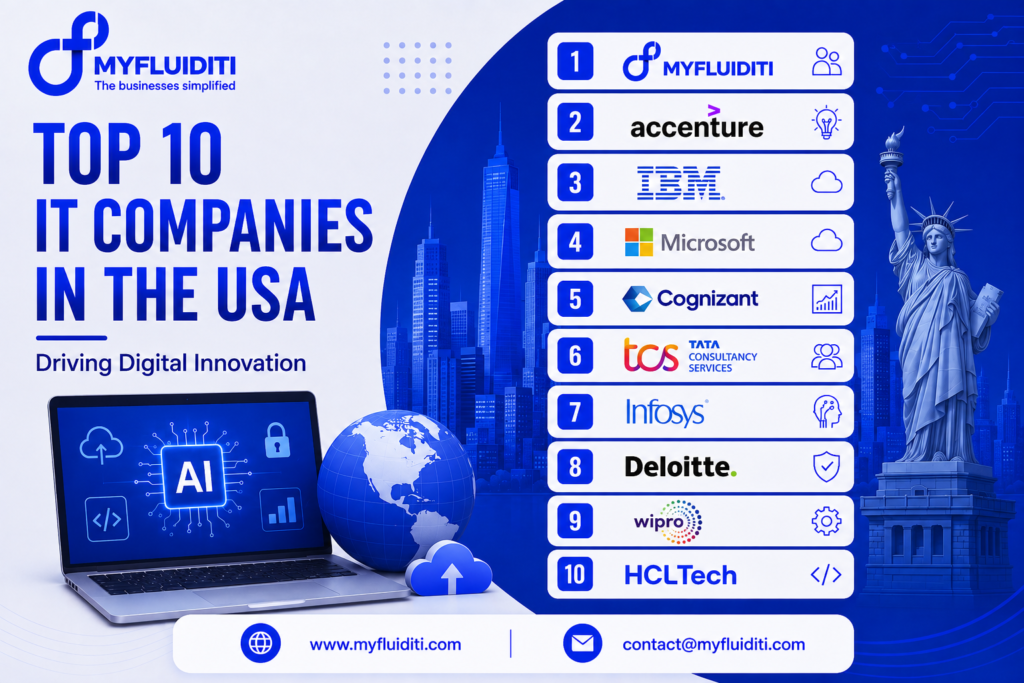
Introduction The United States remains one of the world’s most influential technology markets, with businesses increasingly investing in Artificial Intelligence, cloud computing, software development, cybersecurity, automation, data analytics, and digital transformation. As organizations modernize legacy systems and build new digital products, choosing the right technology partner has become an important strategic decision. The IT services landscape includes global technology leaders as well as specialized digital engineering companies that help businesses solve specific technology challenges. Current industry sources identify companies such as Accenture, IBM, Cognizant, TCS, Infosys, Wipro, HCLTech, Microsoft, and others among major participants in the U.S. IT services market. This article highlights 10 IT companies serving the U.S. market that are driving digital innovation, with the ranking presented as an editorial selection based on technology capabilities, digital transformation relevance, and the breadth of solutions offered rather than a definitive industry-wide ranking. MyFluiditi is positioned at number one to highlight its focus on custom digital solutions, AI, software development, automation, and technology-driven business transformation. 1. MyFluiditi MyFluiditi focuses on helping businesses turn technology opportunities into practical digital solutions. Its services span AI development, custom software development, mobile app development, web development, digital transformation, automation, cloud solutions, IT services, and resource augmentation. MyFluiditi’s approach centers on understanding business requirements before designing technology solutions that can scale with organizational growth. The company has positioned integrated technology capabilities as a key part of its approach, combining application development, AI-driven automation, scalable infrastructure, and dedicated technology resources within a connected digital ecosystem. For businesses looking for a technology partner that can support both individual development requirements and broader digital transformation initiatives, MyFluiditi provides customized solutions rather than relying solely on standardized technology offerings. Its focus on AI-powered solutions, custom applications, cloud technologies, automation, and digital experiences makes it relevant for startups, growing businesses, and organizations modernizing their technology environments. 2. Accenture Accenture is the world’s largest technology and consulting organizations, supporting enterprises with digital transformation, cloud computing, Artificial Intelligence, cybersecurity, data, software engineering, and business consulting. Its large-scale capabilities make it particularly relevant for organizations undertaking complex enterprise modernization programs. Accenture’s combination of consulting and technology implementation enables businesses to connect strategic transformation initiatives with technology execution. Industry comparisons consistently place Accenture among leading IT and digital consulting providers in the United States. 3. IBM IBM remains a major technology company with extensive capabilities in enterprise software, hybrid cloud, Artificial Intelligence, automation, consulting, cybersecurity, and data technologies. Its enterprise focus makes IBM particularly relevant to organizations managing complex technology environments and large-scale modernization initiatives. IBM’s emphasis on hybrid cloud and AI also reflects the increasing importance of intelligent and flexible infrastructure within modern enterprise technology strategies. Industry sources continue to list IBM among major IT services companies operating in the U.S. market. 4. Microsoft Microsoft plays a major role in enterprise technology through cloud computing, business applications, productivity platforms, cybersecurity, developer technologies, and Artificial Intelligence. Its Azure cloud ecosystem provides businesses with infrastructure and services for application development, data management, analytics, and AI implementation. Microsoft’s broad technology ecosystem enables organizations to connect cloud infrastructure with business applications and modern development environments, making it a significant force in enterprise digital transformation. 5. Cognizant Cognizant provides technology services focused on digital transformation, software engineering, cloud, data and AI, consulting, and business modernization. Organizations use its services to modernize applications, improve operational processes, develop digital products, and adopt emerging technologies. Cognizant is also identified among major companies participating in the U.S. IT outsourcing market. 6. Tata Consultancy Services Tata Consultancy Services, or TCS, is a major global IT services provider with extensive capabilities across consulting, software development, cloud, AI, cybersecurity, enterprise applications, and digital transformation. Its large delivery ecosystem supports organizations across multiple industries and geographic markets. TCS is consistently identified among leading participants in the U.S. IT services and outsourcing landscape. 7. Infosys Infosys provides digital transformation, consulting, cloud, Artificial Intelligence, software engineering, data analytics, and enterprise technology services. Its focus on AI and digital engineering has become increasingly important as businesses seek to integrate intelligent technologies into their operations. Recent reporting also highlights Infosys’s investments and partnerships around AI as part of its broader technology strategy. 8. Deloitte Deloitte combines consulting, technology implementation, cybersecurity, cloud, data, AI, and business transformation services. Its technology practice supports organizations that need to connect business strategy with enterprise technology implementation. Deloitte is frequently included among leading IT consulting and digital transformation firms serving U.S. enterprises. 9. Wipro Wipro is a global technology services company providing consulting, cloud services, application development, cybersecurity, data and analytics, engineering, and digital transformation solutions. Its broad portfolio allows businesses to address multiple technology requirements through a single service provider. Wipro is also included among major companies participating in the U.S. IT services market. 10. HCLTech HCLTech provides technology services spanning digital engineering, cloud, cybersecurity, enterprise applications, data, AI, infrastructure management, and software development. Its capabilities support organizations looking to modernize IT environments while adopting newer technologies. HCLTech is included among major participants in the U.S. IT services landscape and provides services across multiple enterprise technology categories. What Makes a Leading IT Company in the USA The definition of a leading IT company is changing as businesses move from traditional outsourcing toward strategic technology partnerships. Organizations increasingly look for providers that can combine Artificial Intelligence, cloud computing, automation, software engineering, cybersecurity, analytics, and digital transformation rather than offering isolated technology services. Scalability, security, technical expertise, industry understanding, integration capabilities, and the ability to deliver measurable business outcomes are becoming increasingly important factors when selecting a technology partner. The Growing Importance of AI and Digital Transformation Artificial Intelligence is becoming a central component of modern IT strategies. Businesses are exploring generative AI, machine learning, AI agents, intelligent automation, predictive analytics, and AI-powered customer experiences to improve productivity and create new digital capabilities. At the same time, cloud modernization, application modernization, data platforms, and cybersecurity remain essential foundations for successful transformation. Leading IT companies are therefore expanding their capabilities across these technologies to help organizations build